
Collaboration Center
IntercontinentalExchange, IncHouse & Home
3.85.00 Reviews
- Version
- 1.9.0
- Installs
- 10.00K
- Age Rating
- Everyone
Screenshots
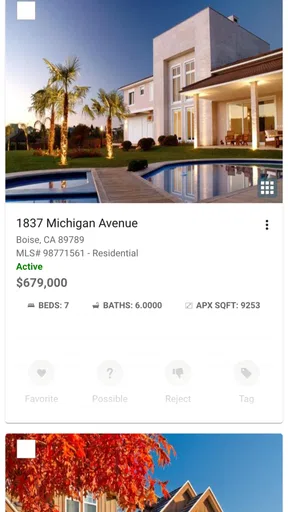

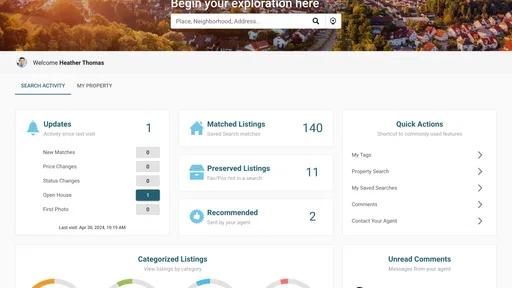

Our Review of Collaboration Center
 Analysis by Appyee
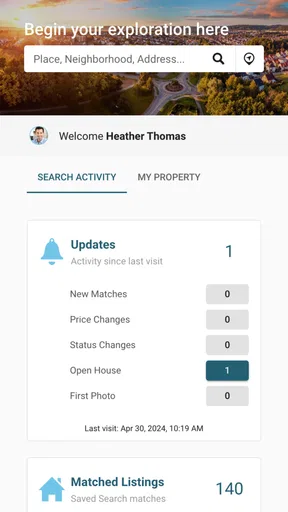
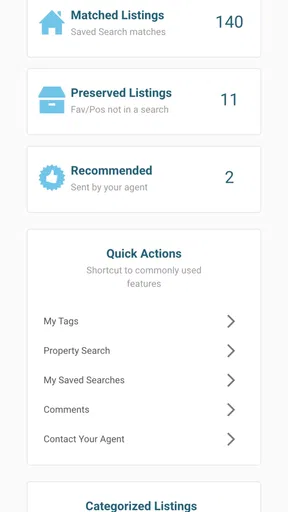
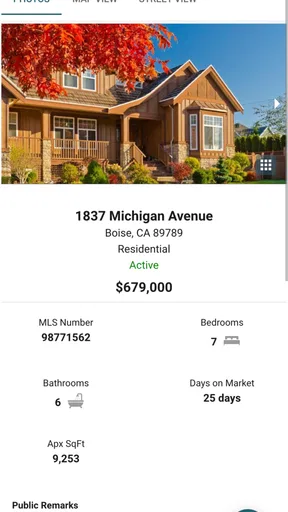
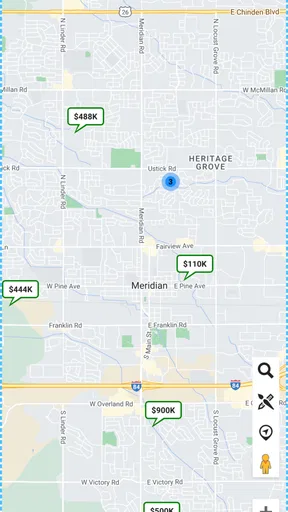
Finding a home is rarely a one-person task. Even when one person leads the search, decisions often involve a partner, relatives, an agent, or several people comparing the same possibilities from different places. Collaboration Center is a free House & Home app from IntercontinentalExchange, Inc that approaches that problem through shared activity rather than treating the search as a private list of bookmarks. After spending time with it, I see the main appeal clearly: it is most useful when several people need to stay aligned while looking for the right home.
Collaboration is the real reason to try this app. If you only want to browse casually or check a single property once, a normal property-search service may feel more direct. If your search includes opinions, shortlists, follow-up conversations, and changing priorities, this app has a more relevant role. Its store summary presents it as a way to find a perfect home, while the short description identifies it as a Collaboration Center. That combination tells me where it fits best: alongside the home-search process, not necessarily as a complete replacement for every familiar property tool.
How the shared-search idea works in daily life
The first thing I noticed is that the app makes more sense when I imagine a real group rather than a solo user. A couple might each look at homes during separate commutes, then compare what caught their attention later. A family could discuss location and space without relying on scattered messages. An agent and a client may need a common place to keep the conversation focused. The value comes from bringing those moments closer together.
That also changes how I judge the app. A collaboration tool does not need to make every person perform the same action at the same time. It needs to reduce the small misunderstandings that build up during a long search: which home someone meant, whether a suggestion was still being considered, or whether a decision had already changed. When the connection is working, a shared workspace can be more useful than sending individual screenshots and trying to reconstruct the conversation afterward.
In one realistic scenario, I would use it while moving with a partner to a new area. During lunch, I might review a home that seems suitable for the budget and location. Later, my partner could look at the same shared context and respond from a different place. Instead of expecting both of us to be available during the original search, the app supports a more flexible rhythm. That is a practical advantage for people whose schedules rarely match.
The trade-off is that collaboration only helps when everyone participates consistently. If one person continues using text messages, another keeps notes elsewhere, and a third checks the app only occasionally, the shared process can become fragmented again. I would recommend agreeing on one simple habit before starting: use the app for the main discussion and keep private notes separate only when necessary. That small decision matters more than installing another tool.
Where connectivity changes the experience
Because this kind of app depends on shared activity, network access is part of the experience rather than a background detail. A connected session is important when information needs to move between people, when a conversation needs to be current, or when a decision depends on what another participant has just seen. I would avoid treating it like a static notebook that can be relied on equally in every situation.
This matters during property visits. A user may be standing outside a home, moving between neighborhoods, or dealing with an unreliable signal inside a building. In those moments, I would prepare the important details before arriving and avoid making the app the only place where essential information exists. If a decision is time-sensitive, keeping the address or appointment details available through another trusted method is sensible. That is not a criticism of this particular app; it is a practical rule for any connected collaboration workflow.
Connectivity also affects the emotional side of a home search. People often want quick reactions when a promising option appears. A delay can lead to duplicated work, especially if two users assume the other person has already reviewed something. I found that the app is best used with clear expectations: if a response is urgent, say so directly rather than assuming the other participant will notice immediately.
There is a useful distinction between browsing and coordinating. A conventional home-search app may be better for independently exploring a large range of listings or beginning with broad filters. Collaboration Center becomes more interesting once the search has narrowed and people need to compare, discuss, and make progress together. I would therefore use a traditional property service for discovery when needed, then use this app as the shared layer for decisions. That combination is more realistic than expecting one application to handle every stage equally well.
Using it on a phone without losing the thread
Mobile use is where the app’s purpose becomes easiest to understand. Home searches do not happen only at a desk. They happen between appointments, in a coffee shop, during a commute, or while walking through an unfamiliar area. A phone-based collaboration space lets the process follow the user rather than forcing every discussion into a single scheduled session.
I particularly like the possibility of short check-ins. Instead of waiting until evening to review everything, I can imagine opening the app after seeing a new option, recording my reaction, and letting the other person continue from there. Short contributions are often more realistic than long sessions, especially when a search stretches over several days. The app’s usefulness comes from supporting that continuity.
Still, mobile convenience has limits. A phone screen is not ideal for comparing many homes, reading lengthy material, or making a complicated decision while distracted. I would use the app for quick reviews and shared coordination, then set aside a calmer moment for the final comparison. Trying to make every decision while walking or multitasking is likely to create avoidable mistakes, regardless of how well the app connects the participants.
A second practical tip is to keep the group small and purposeful. Collaboration becomes harder to follow when too many people add opinions without clear roles. For a couple, that may mean both users contribute freely. For a larger family, it may help to decide who is responsible for the final shortlist. The app can support the conversation, but it cannot decide whose preferences take priority.
I would also avoid treating every shared reaction as a final verdict. Early impressions are useful, but home searches change as people learn more about areas, travel times, costs, and practical needs. A good workflow leaves room for a property to move from “interesting” to “needs checking” rather than forcing an immediate yes-or-no decision. That makes the shared space more useful over time and prevents an impulsive comment from becoming an accidental commitment.
What to do when the connection or workflow breaks
Every collaborative process has failure points. The network may be weak, someone may forget to check the app, or a participant may misunderstand what another person meant. My advice is to build recovery into the routine instead of assuming the app will eliminate all confusion.
Before a viewing, I would write down the essentials I need for the appointment and keep the relevant contact details accessible through a separate channel. During the visit, I would make brief personal notes about the things that matter most, such as the layout, noise, travel practicality, or questions that need answers. Once the connection is stable again, those observations can be brought back into the shared discussion. This creates a reliable fallback without undermining the app’s collaborative purpose.
If a group becomes out of sync, the best recovery method is a short recap rather than a long chain of corrections. I would state which homes are still under consideration, which questions remain open, and what decision is needed next. The app can then serve as the place where the updated conversation continues. This is one of the less obvious lessons of using a shared home-search tool: clarity in the message often matters more than the number of messages.
Another useful habit is separating facts from impressions. “The commute needs checking” is different from “I dislike this area,” and “we should ask about the room size” is different from “this will not work.” Keeping those distinctions visible helps other participants understand what is confirmed, what is personal preference, and what still depends on follow-up. A collaboration app is much more effective when users give it structured input rather than a stream of vague reactions.
I would not choose this app as my only safety net for a time-critical appointment or transaction. A connected workspace can organize a search, but important commitments deserve confirmation through the appropriate direct channel. That is especially true when several people are involved and a missed update could affect everyone’s schedule.
Using less data while staying coordinated
People often overlook data use during a home search because the attention is on properties and decisions. In practice, a mobile collaboration workflow can involve repeated openings, messages, images, and updates. I would use the app thoughtfully when relying on a limited mobile plan or a weak connection.
The simplest approach is to avoid unnecessary refreshing. If nothing has changed, repeatedly reopening the same conversation adds little value. I would check at natural points in the day, such as after a viewing or before discussing the shortlist, rather than constantly watching for activity. For a household sharing one plan, that habit can make the process feel calmer as well as more efficient.
It is also worth choosing the right moment for detailed review. When I am on a stable connection, I would handle the heavier part of the comparison and use mobile sessions for focused updates. That division keeps the phone workflow practical: quick reactions while moving around, deeper discussion when I have time and a dependable connection.
Notifications, if enabled on the device, should be treated as prompts rather than a substitute for checking the full context. A brief alert may tell me that something needs attention, but it may not explain the reasoning behind another person’s reaction. I would open the relevant discussion before making a decision, especially when the property search involves several competing preferences.
There is another data-conscious benefit to keeping the conversation organized. When the group uses one shared thread instead of sending the same material through several channels, people are less likely to duplicate screenshots, repeat questions, or ask for information that was already discussed. The saving is not only technical; it reduces the mental cost of searching through multiple conversations.
Who will benefit most from Collaboration Center?
I think the strongest audience is people who are actively searching with at least one other person. Couples living apart, families coordinating a move, and clients who want a more organized conversation with a housing professional are the clearest examples. The app is also more appealing when the search is ongoing rather than a one-time glance.
It may suit users who prefer a shared decision process over private bookmarks. If your main frustration is that everyone has a different version of the shortlist, a collaboration-focused tool addresses that problem directly. It can also help people who are not available at the same time, because the search can continue in smaller contributions instead of requiring one long meeting.
I would be more cautious if you are searching alone, already have a dependable system that everyone follows, or mainly need advanced property discovery tools. In those cases, the extra collaboration layer may feel unnecessary. Users who prefer a simple checklist may also find the social side less valuable than a straightforward notes application. The right choice depends on whether coordination is the problem you are trying to solve.
The audience should also be comfortable with a relatively focused tool. Collaboration Center is not something I would install merely because it is free and expect it to transform an unstructured search automatically. Its benefits appear when the people involved agree to use it as a shared working space. Without that agreement, the app risks becoming another place to check.
Version, accessibility, and everyday practicality
The app is available at no cost, which makes experimentation easy for a household that wants to test a shared workflow without adding a subscription decision at the start. It carries an Everyone age rating, so its intended audience is broad. On Android, the listed minimum operating-system requirement is version 7.0, making it accessible to many older devices as well as newer phones.
The current release is version 1.9.0. I would still keep the application updated through the normal store process, particularly for a connected tool where reliability and compatibility matter. Updates are most useful when they reduce friction in everyday actions, so I would pay attention to whether the version installed on each participant’s phone is current before beginning an important shared search.
IntercontinentalExchange, Inc is the developer behind the app. Its presence in the House & Home category is appropriate because the practical goal is tied to finding and discussing a home rather than general-purpose messaging. The app has reached over ten thousand installs and holds a 3.8 average from nineteen ratings, with five written reviews. Those figures suggest some early interest, but I would treat the rating as a starting signal rather than a complete picture of how it will fit every household.
For me, the rating also reinforces the need to judge the workflow personally. A collaboration app can be excellent for one group and unnecessary for another because success depends heavily on how people communicate. I would test it with a low-pressure shortlist first, rather than moving an urgent or complicated search into it immediately.
How it compares with familiar alternatives
The closest alternative is often not another dedicated home app but a mixture of messaging, screenshots, bookmarks, and notes. That setup is flexible, but it scatters the search across places. One person may send a screenshot in a chat, another may save a link privately, and a third may remember a detail only from a phone call. Collaboration Center is more appealing when the goal is to make the group’s process feel like one continuing activity.
A standard property-search service may still be better for exploring a broad market. Such services are usually where I would expect to begin when I need to discover possibilities, compare locations, or search according to practical criteria. Collaboration Center has a narrower strength: helping people work together after the search has become a shared project.
A generic notes app can be better for personal observations, especially when I want complete control over formatting or need to record thoughts without involving the group. A messaging app can be better when an immediate answer matters more than organization. The advantage here appears when the group wants both conversation and a home-focused context. That is a meaningful distinction, but it does not make the app universally superior.
My preferred workflow would combine tools deliberately: use established search resources for discovery, use personal notes for private observations, and use Collaboration Center for the shared shortlist and decisions. That may sound less simple than choosing one app, but it reflects how real home searches work. Each tool handles the part it is best suited to handle.
My connectivity verdict
After reviewing Collaboration Center as a mobile House & Home app, I see it as a practical option for people who want to search for a home together rather than merely browse alone. Its strongest moments come when participants are separated by distance or schedules, yet still need a common place to exchange reactions and keep the process moving.
The main caution is connectivity. I would not depend on any connected workspace as the sole source of appointment details, urgent confirmations, or personal notes during a property visit. Prepare the essentials, use the app for coordinated discussion, and keep a simple fallback for moments when the signal or the workflow is unreliable. That approach lets the app help without giving it more responsibility than it can reasonably carry.
My recommendation is conditional but positive: try it if your home search involves a partner, family member, or professional and scattered communication is slowing you down. Skip it if you only need private browsing or a basic checklist. For the right group, the free price and focused collaboration idea make it worth testing, especially when mobile connectivity is treated as part of the workflow rather than something to take for granted.
In short, Collaboration Center is not most valuable because it promises to replace every home-search tool. I recommend it because it gives a shared search a clearer center. When everyone uses it with realistic expectations, it can turn disconnected reactions into a more manageable conversation and help a complicated decision feel a little more coordinated.
Verdict
Strengths of Collaboration Center
- Centralizes team chats, files, tasks, and updates in one workspace.
- Shared calendars and notifications help teams coordinate deadlines efficiently.
- Permission controls make it easier to manage access to projects and documents.
- Supports real-time collaboration, reducing delays when reviewing shared work.
- Useful search tools help locate conversations, files, and project details quickly.
Limitations of Collaboration Center
- The interface may feel overwhelming for new users managing multiple workspaces.
- Some advanced collaboration features may require a paid subscription.
- Frequent notifications can become distracting without careful settings adjustments.
- Performance may slow when handling large teams or numerous shared files.
- The app’s usefulness depends on teammates consistently adopting the platform.
Similar Picks in This Category
View All
Universal TV Remote Control
CodeMatics Media Solutions3.9

AlfredCamera Home Security app
Alfred Systems Inc.4.7

Planner 5D: AI Home Design
Planner 5D4.5

Universal Tv Remote-Cast to TV
One Music Player4.1

Zillow: Homes for Sale & Rent
Zillow Group4.8

99acres Buy/Rent/Sell Property
infoedge.com4.3
Frequently Asked Questions
What is Collaboration Center and what can I use it for?
Collaboration Center is designed to help teams coordinate work, share information, and communicate around common projects or tasks. Depending on the version and organization using it, you may be able to access shared files, follow updates, assign responsibilities, review progress, and participate in discussions. It is most useful for workplaces, study groups, and other teams that need a central place to keep collaboration organized.
Is Collaboration Center free to download and use?
The application may be available to download without an upfront charge, but access to its complete features can depend on the service plan, organization account, or administrator settings. Some users may receive access through their employer, school, or another institution. Before installing it, check the store listing and your organization’s instructions for information about subscriptions, premium tools, account requirements, or possible in-app purchases.
Do I need an account or invitation to use Collaboration Center?
In most cases, Collaboration Center is intended for members of an existing team or organization, so you may need to sign in with a supported account or accept an invitation before you can use its main features. Some versions may allow limited access without registration, but shared workspaces and private content normally require authorization. Contact the workspace administrator if you cannot join or sign in.
Does Collaboration Center work on both Android and iOS devices?
Availability can vary according to the specific Collaboration Center product and the publisher’s current release. If Android and iOS versions are offered, the general experience should be similar, although menus, permissions, notifications, and certain tools may look different between platforms. Check the official Google Play or App Store listing, along with the required operating-system version, before downloading it to your device.
What privacy and security considerations should I know before using it?
Because Collaboration Center can involve workplace, school, or project information, review its requested permissions and privacy policy before signing in. Shared documents, messages, profile details, and activity may be visible to workspace members or administrators according to the organization’s settings. Use a strong password, enable available security options, avoid sharing confidential data in the wrong workspace, and keep the app updated for security fixes.
